info@1clickprint.com
01909 561888

How to Calibrate Bi-Directional Printing on Your DTF Printer

How to Calibrate Bi-Directional Printing on Your DTF Printer

Watch the video walkthrough: DTF Printer Calibration Guide on YouTube

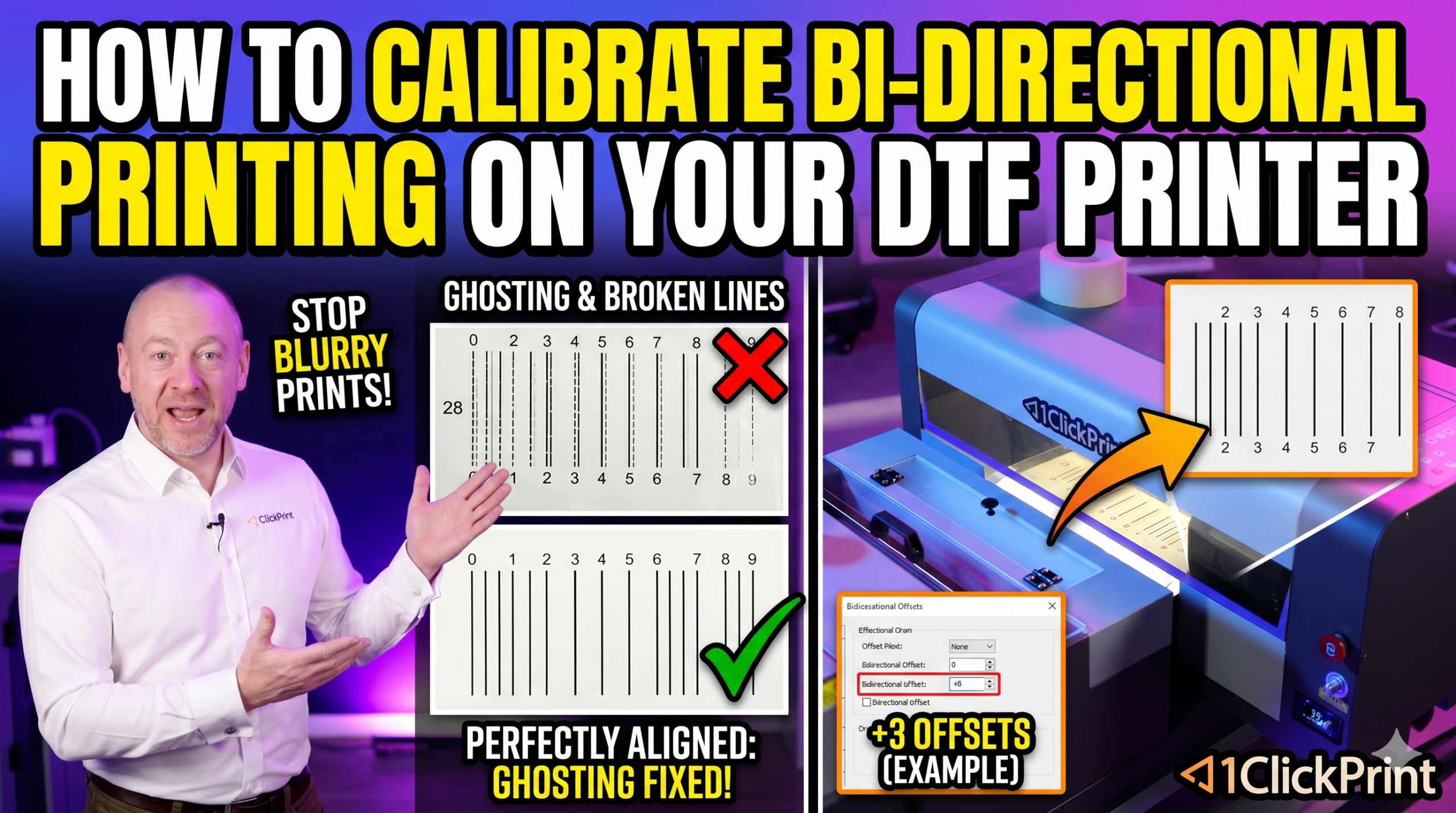
If your DTF prints look horizontally blurred or show a ghosting effect, your bi-directional calibration is likely off. This is one of the most common calibration issues we see at 1ClickPrint tech support, and the good news is it only takes a minute or two to fix.

What Is Bi-Directional Printing?

Your printer lays down ink as the print head moves in both directions — left to right and right to left. This is called bi-directional printing, and it effectively doubles your print speed. However, if the left-to-right pass and the right-to-left pass aren’t perfectly aligned, the result is a horizontal blur or ghosting effect on your prints.

Before You Start

Before running any calibration, make sure you’ve covered these basics:

  • Warm up your printer. Temperature affects calibration. If your machine has been sitting in a cold environment, turn it on and let it warm up before calibrating. Ideally, do a test print first to bring the machine up to operating temperature. Calibrating a cold machine will give you inaccurate results.
  • Run a nozzle check. Print a nozzle check pattern to confirm your print heads are in good condition. The lines should be sharp and the pattern undistorted. Minor gaps may clear after a soak or some printing, but significant issues should be addressed first.
  • Check your film tension. The film roll should spin with just a little resistance when turned by hand. It shouldn’t be sagging at the back, but it also shouldn’t be so tight that the printer struggles to feed it.

Step-by-Step: Horizontal Bi-Directional Calibration

  1. In your printer manager software, navigate to the Calibrate menu and select Horizontal.
  2. Click Print. The printer will produce a calibration test pattern.
  3. Examine the output. You’ll see a series of vertical lines arranged around a centre point marked zero. The goal is for the lines at zero to form a single, solid, straight line.
  4. If zero is not a solid line, look along the scale to find the number where the lines do align into a clean, straight line. Note whether it’s a positive or negative number.
  5. In the software, adjust the value by that amount. For example, if +3 is the aligned line, add 3 to the current value. If –3 is correct, subtract 3 from the current value.

Important: This is not the number you set the value to — it’s the amount you change it by. If the current value is 120 and the test shows +3, set it to 123.

  1. Click Save, then click Print again to produce a second test pattern.
  2. Check the new output. The lines at zero should now be perfectly aligned into a solid straight line.
  3. Once confirmed, save and exit.

Troubleshooting

If you’re still seeing ghosting after calibration:

  • Ensure the machine was fully warmed up before calibrating.
  • Re-run the nozzle check to rule out print head issues.
  • Check that your film tension is correct — too tight or too loose can both cause problems.
  • If the issue persists, get in touch with our tech support team.


Tip: If your working environment gets particularly cold overnight, it’s worth rechecking this calibration periodically, especially during winter months.

About the author

Jamie Turner has spent more than two decades at the sharp end of the print industry. As the driving force behind 1ClickPrint and DTF-Printers.co.uk, he has navigated the sector’s transition from traditional digital methods into the high-growth world of Direct-to-Film technology. A familiar voice in the trade, Jamie is a frequent contributor to leading printing magazines, where his insights and columns have helped shape the conversation on hardware reliability and production efficiency where his focus is on the nuts and bolts of what makes a print business actually profitable. Through this site, Jamie shares the hard-won expertise gained from 20 years on the shop floor and in the boardroom. He remains dedicated to demystifying new tech and providing the honest, technical guidance that printers need to stay ahead. When he isn’t testing the latest machinery, you’ll usually find him advocating for better standards, lower costs and innovation across the UK print trade.
