FREE Shipping on orders over £50

info@1clickprint.com
01909 561888
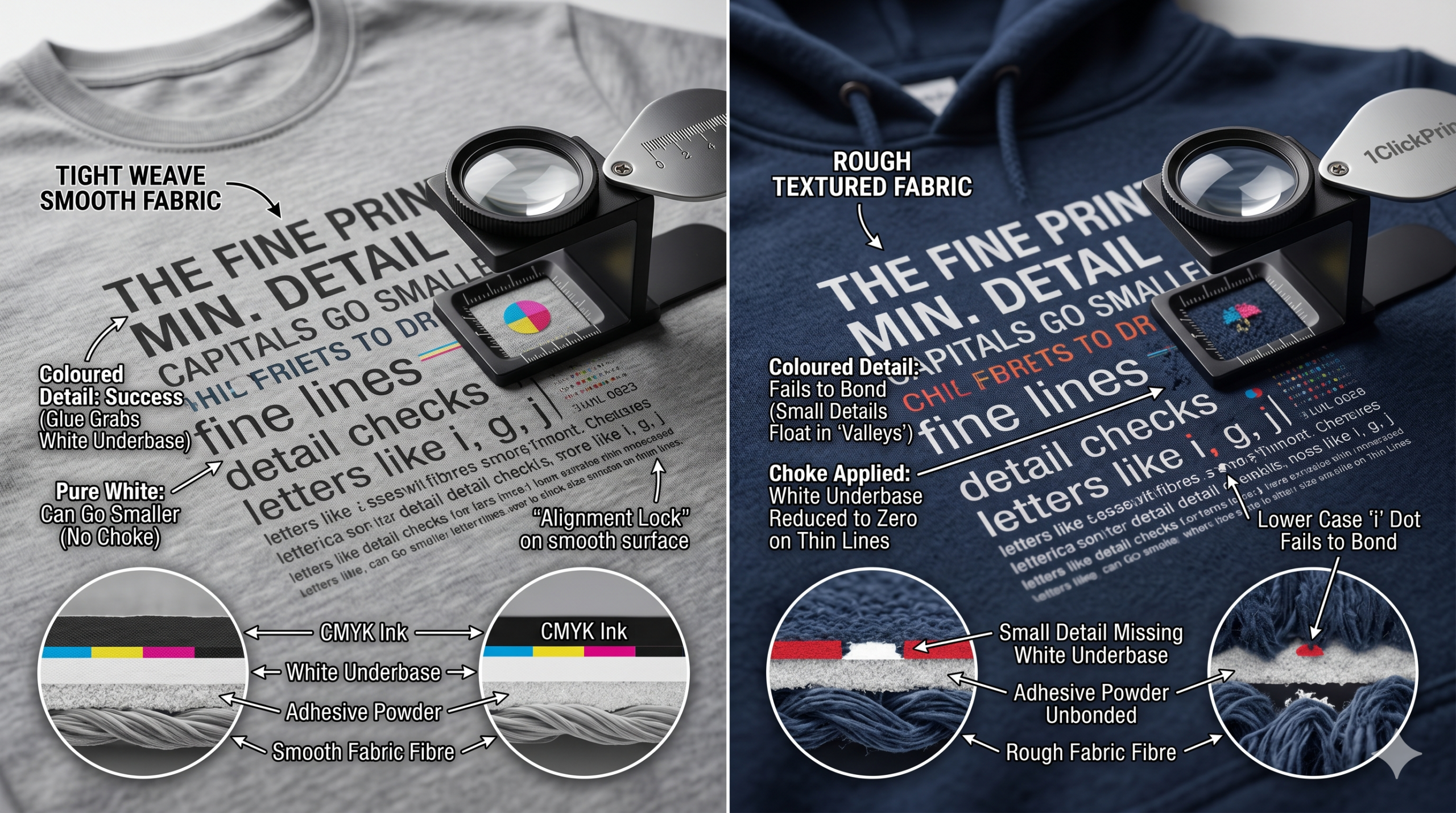
One of the most common questions we get in the workshop is: “How small can my text be before it stops sticking?” Whether you are printing neck labels, intricate “tech-wear” graphics, or tiny disclaimer text, there is a physical limit to what the technology can handle.
In DTF, it isn’t just about what the printer can see—it’s about what the glue can grab. Here is the breakdown of the science behind tiny details and how to push your 1ClickPrint machine to its absolute limit.
To understand small detail, you have to understand the “sandwich.” DTF works because the adhesive powder sticks to the wet white ink. The powder does not stick to the CMYK ink or the film itself.
The Problem: On tiny details, your RIP software (like Digital Factory or Cadlink) applies something called a “Choke.” This pulls the white underbase in by 1 or 2 pixels to ensure you don’t get a cheeky white outline around your coloured text.
The Result: If you have a line that is only 3 pixels wide and you apply a 1-pixel choke from both sides, you are left with only 1 pixel of white ink to hold the glue.
If the line is even thinner, the choke can reduce the white underbase to nothing. Without that white ink “nest,” the powder has nothing to stick to, and the detail simply disappears during the shake or the press.
If you are printing a design that is 100% white, you have a massive advantage.
Because there is no colour on top to “hide,” you can turn the choke off entirely or set it to zero.
This means the adhesive can grab the full width of the printed line. As a result, you can generally print much finer lines in pure white than you can in red, blue, or multi-coloured text.
Not all letters are created equal. When you are pushing the limits of font size, Capitals are your best friend.
The “i” Factor: Lower case letters are full of “faffy” details. The tiny dot on the letter ‘i’ (the tittle) is often the first thing to fail. It is so small that it rarely gets enough powder or enough surface area to bond to the fabric.
Ascenders and Descenders: The thin tails on letters like ‘g’, ‘j’, or ‘y’ are also high-risk zones.
The Fix: If you need a neck label to be readable at a tiny scale, use ALL CAPS. Capital letters have a larger “footprint” and more surface area for the adhesive to grab onto.
You can print the most perfect, microscopic detail on the film, but if the fabric isn’t right, it won’t matter.
Tight Weave (Smooth): On a high-quality ringspun cotton t-shirt, the surface is flat. A tiny 0.5mm dot has a solid “landing pad” to bond with.
Rough Texture (Coarse): On a pique polo shirt, a heavy canvas tote bag, or a fleece-lined hoodie, the fabric is full of “peaks and valleys.”
The Risk: A fine line or a tiny dot might land right over a “valley” in the fabric. Because the detail is so small, it ends up floating in mid-air rather than touching a fibre. When you peel the film, that detail stays on the film or falls off in the first wash.
Pro Tip: For rough fabrics, avoid any lines thinner than 1mm. For smooth t-shirts, you can often push down to 0.5mm if your alignment is spot on.
| Feature | Recommendation | Why? |
| Minimum Line Weight | 0.5mm (White) / 0.75mm (CMYK) | Accounts for the RIP software “choke.” |
| Font Style | Sans Serif (e.g., Arial, Helvetica) | Avoids thin “flicks” (serifs) that won’t stick. |
| Case | UPPERCASE | More surface area for the adhesive powder. |
| Fabric | Smooth, high-thread count | Prevents details from “falling into the gaps.” |
If you are unsure, do a stress test. Put a line of text on your next gang sheet starting at 10pt and going down to 4pt. Press it onto a scrap of your chosen fabric and give it a “brutal” wash. Whatever is still there and looking sharp is your “house limit” for that specific fabric and setting.
